
विवरण
The Gravity Forms IP Limit Add-On allows you to restrict how many times a user can submit a form based on their IP address, within a specified number of days.
Features:
- Enable or disable IP limiting per form.
- Set a custom number of days to look back.
- Set the maximum number of submissions allowed from the same IP in that period.
- Adds a validation error if the IP has already submitted too many times.
Perfect for:
* Preventing form abuse/spam
* Limiting contact form submissions
स्क्रिनसटहरू
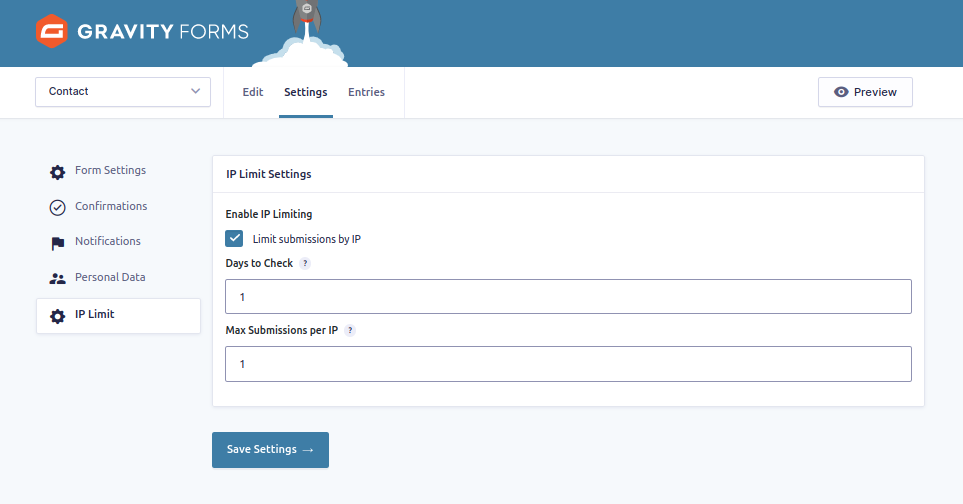
IP Limit settings in the form admin. 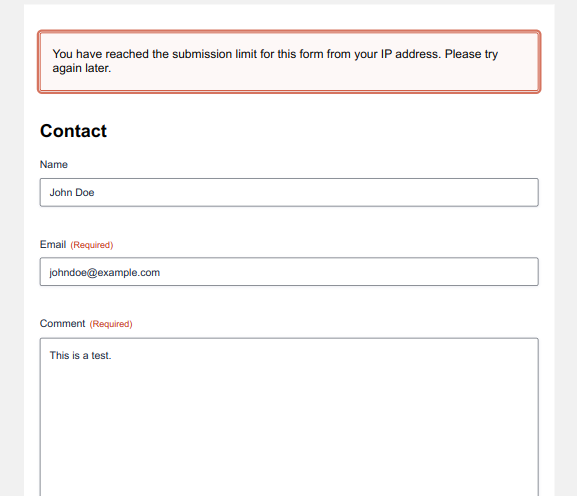
Validation message when submission is blocked.
स्थापना
- Upload the plugin folder to
/wp-content/plugins/or install via WordPress Admin > Plugins > Add New > Upload Plugin. - Activate the plugin through the ‘Plugins’ menu.
- Navigate to Forms > [Your Form] > Settings > IP Limit to configure.
प्रश्नोत्तर
-
Does this work for all forms?
-
Yes, you can enable or disable it per form in the form’s settings.
-
Can I set different limits for each form?
-
Yes, each form has its own setting for days and max entries.
-
What happens when a user hits the limit?
-
They will receive a validation error, and the form will not submit.
समीक्षाहरू
यस प्लगिनको लागि कुनै समीक्षाहरू छैनन्।
योगदानकर्ता र डेभलपरहरू
“IP Limit Add-On for Gravity Forms” खुला स्रोत सफ्टवेयर हो। निम्न व्यक्तिहरूले यो प्लगिनमा योगदान गरेका छन्।
योगदानकर्ताहरू
“IP Limit Add-On for Gravity Forms” लाई आफ्नो भाषामा अनुवाद गर्नुहोस्
विकासमा रुचि छ?
आरएसएस द्वारा कोड ब्राउज गर्नुहोस्, एसभीएन रिपजिटरी हेर्नुहोस्, वा विकास लग को सदस्यता लिनुहोस्।
चेन्जलग
1.0
- Initial release.