सामग्रीमा जानुहोस्
WordPress.org

नेपाली

  • थिमहरू
  • प्लगिनहरू
  • समाचार
  • बारेमा
  • नेपालीमा वर्डप्रेस
  • टिम
  • WP-CLI
  • वर्डप्रेस प्राप्त गर्नुहोस्
वर्डप्रेस प्राप्त गर्नुहोस्
WordPress.org

Plugin Directory

WP ShareX

  • प्लगिन पेस गर्नुहोस्
  • मेरा मनपर्दोहरू
  • लगइन गर्नुहोस्
  • प्लगिन पेस गर्नुहोस्
  • मेरा मनपर्दोहरू
  • लगइन गर्नुहोस्

यो प्लगिन वर्डप्रेसका ३ प्रमुख नवीनतम रिलीजहरूसँग परीक्षण गरिएको छैन। यो अब सम्भवतः व्यवस्थित वा समर्थन नभएको हुन सक्छ र वर्डप्रेसका नयाँ संस्करणहरूमा प्रयोग गर्दा अनुकूलता सम्बन्धी समस्या हुन सक्छ।

WP ShareX

joomdev द्वारा
डाउनलोड गर्नुहोस्
  • विवरण
  • समीक्षाहरू
  • स्थापना
  • विकास
सहायता

विवरण

WP ShareX is an advanced WordPress Social Share plugin enables you to add social share buttons on Posts and pages. You can assign buttons on Top of the Content, Bottom of the Content, Sidebar and on media.

Features of WP Social Share by JoomDev
1. 24 Social Network
2. You have the option to select either Icons or Icons with Text
3. 3 Button Shapes
4. 4 Button Animations
5. URL Shortening Option with Bitly and Goo.gl
6. Embed Twitter Handle and desired tags with Tweet
7. 4 Button display Location e.i. Top of the Content, Bottom of the content, Media, and Sidebar
8. Hide On Mobile Ability
9. Default Share Count Option. (You can play with your user’s mind)
10. Encourage your Audience to share your content with Share Incentive Feature

स्क्रिनसटहरू
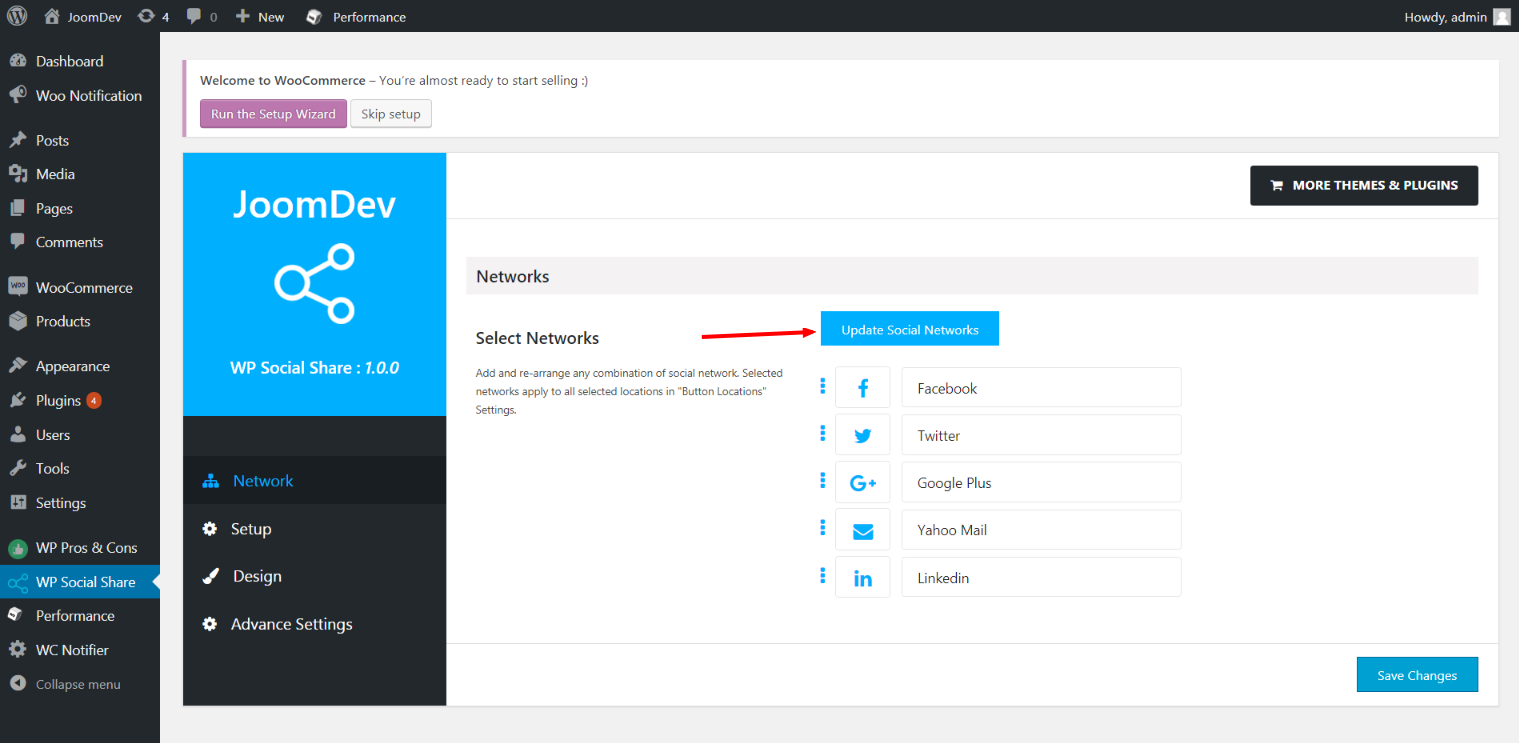
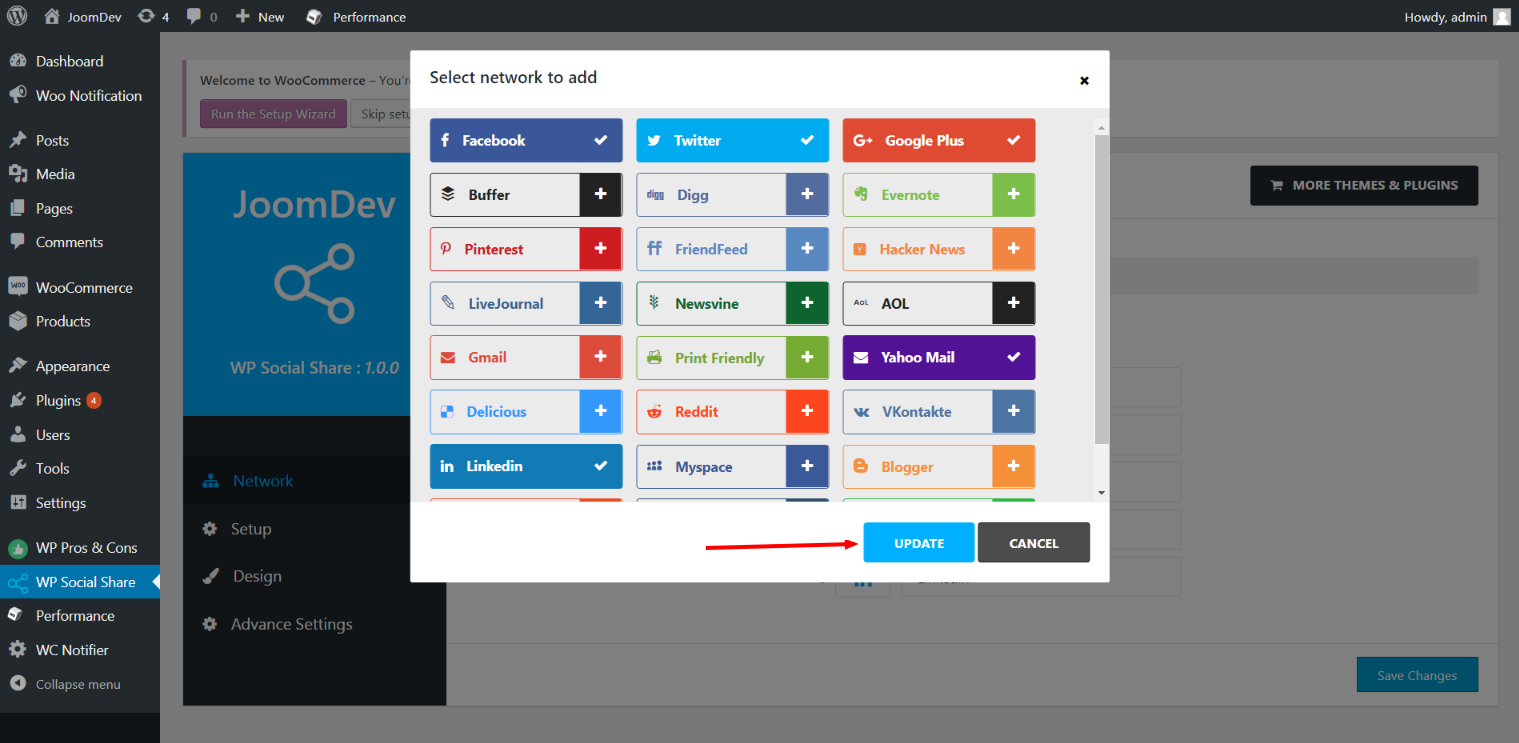
Click here to select networks
Update networks after selecting them.
Setup plugin and api settings.
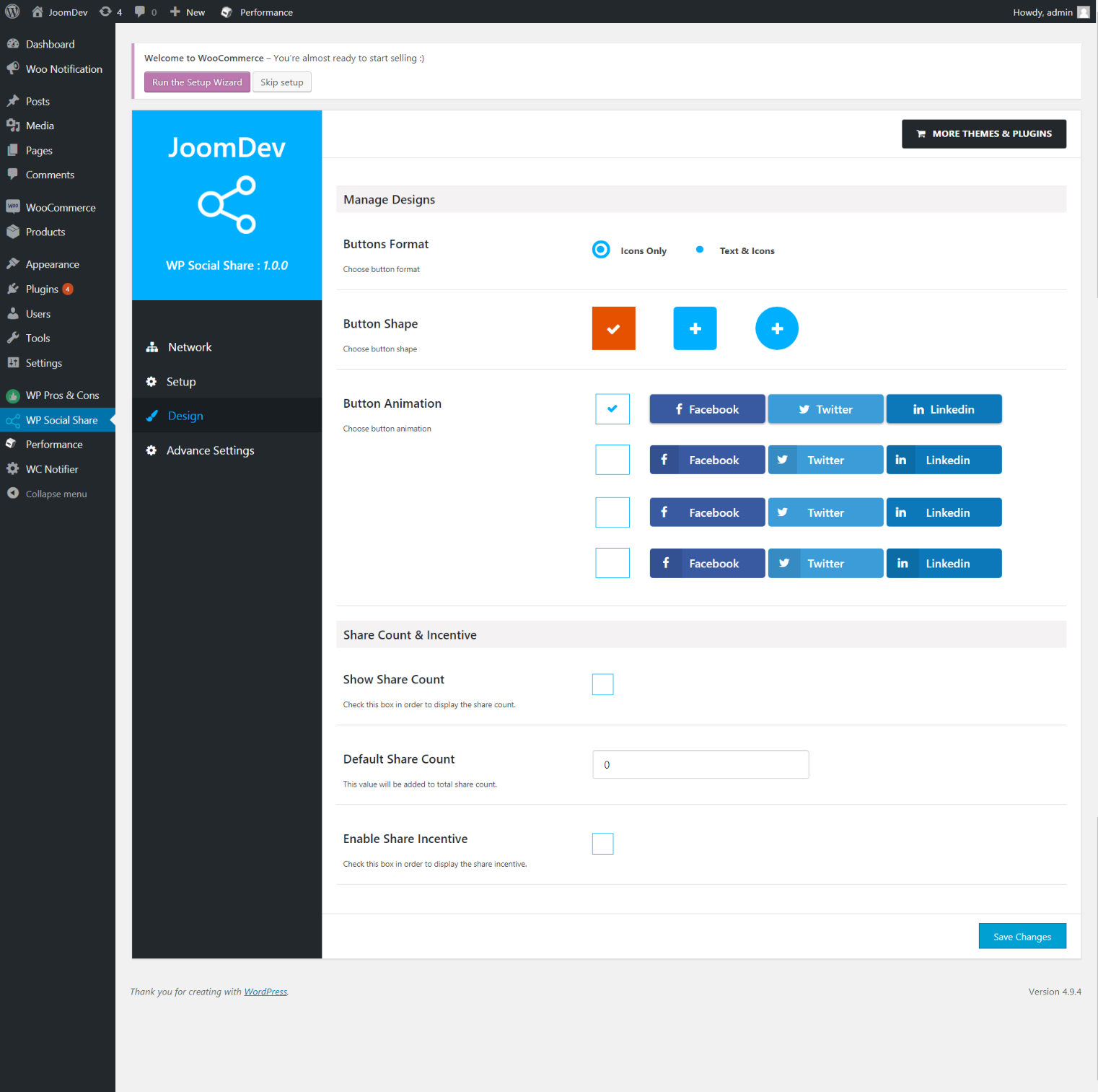
Select any design to display the buttons.
For mobile
For mobile

स्थापना

Way 1: 1. Upload joomdev-wp-social-share.zip to the /wp-content/plugins/ directory 2. Extract the zip file. 3. Activate the plugin from wordpress plugins page. And you have done.

Way 2: 1. Go to plugins page in admin. 2. Click on Add New button. 3. Search for “WP ShareX”. 4. Click install on WP Social Share. 5. Activate the plugin.

प्रश्नोत्तर

Installation Instructions

Way 1:
1. Upload joomdev-wp-social-share.zip to the /wp-content/plugins/ directory
2. Extract the zip file.
3. Activate the plugin from wordpress plugins page. And you have done.

Way 2:
1. Go to plugins page in admin.
2. Click on Add New button.
3. Search for “WP ShareX”.
4. Click install on WP Social Share.
5. Activate the plugin.

How do I use this plugin?

See description.

समीक्षाहरू

Excellent!

Arnab Mohapatra मार्च 16, 2018 1 जवाफ
Incredible plugin. It allows to add any sharing button on the page simply and fast!
सबै 1 समीक्षा पढ्नुहोस्

योगदानकर्ता र डेभलपरहरू

“WP ShareX” खुला स्रोत सफ्टवेयर हो। निम्न व्यक्तिहरूले यो प्लगिनमा योगदान गरेका छन्।

योगदानकर्ताहरू
  • joomdev

“WP ShareX” लाई आफ्नो भाषामा अनुवाद गर्नुहोस्

विकासमा रुचि छ?

आरएसएस द्वारा कोड ब्राउज गर्नुहोस्, एसभीएन रिपजिटरी हेर्नुहोस्, वा विकास लग को सदस्यता लिनुहोस्।

चेन्जलग

1.0.0

  • New Plugin initialized.

मेटा

  • संस्करण 1.0.0
  • पछिल्लो अपडेट 8 वर्ष अघि
  • सक्रिय स्थापना 10+
  • वर्डप्रेस संस्करण 3.0 वा उच्च
  • जाँच गरिएको 4.9.29
  • भाषा
    English (US)
  • ट्यागहरू
    sharesocialsocial share
  • उन्नत दृश्य

रेटिङ्गहरू

५ मा 5 तारा।
  • 1 5-तारा समीक्षा 5 तारा 1
  • 0 4-तारा समीक्षाहरू 4 तारा 0
  • 0 3-तारा समीक्षाहरू 3 तारा 0
  • 0 2-तारा समीक्षाहरू 2 तारा 0
  • 0 1-तारा समीक्षाहरू 1 तारा 0

Your review

See all reviews

योगदानकर्ताहरू

  • joomdev

सहायता

केही भन्नु छ? सहयोग चाहियो?

सहायता फोरम हेर्नुहोस्

दान गर्नुहोस्

के तपाईँ यस प्लगिनको उन्नतिको लागि सहायता गर्न चाहनुहुन्छ?

यो प्लगिनको लागि दान गर्नुहोस्

  • बारेमा
  • समाचार
  • होस्टिङ
  • गोपनीयता
  • सोकेस
  • थिमहरू
  • प्लगिनहरू
  • प्याटर्नहरू
  • लर्न
  • सहायता
  • डेभलपरहरू
  • WordPress.tv ↗
  • संलग्न हुनुहोस्
  • कार्यक्रमहरू
  • दान ↗
  • भविष्यको लागि पाँच
  • WordPress.com ↗
  • म्याट ↗
  • बिबिप्रेस ↗
  • बडीप्रेस ↗
WordPress.org
WordPress.org

नेपाली

  • हाम्रो X (पहिले ट्विटर) खातामा जानुहोस्
  • हाम्रो Bluesky खाता भ्रमण गर्नुहोस्
  • हाम्रो म्यास्टोडन खाता भ्रमण गर्नुहोस्
  • हाम्रो थ्रेड्स खातामा जानुहोस्
  • हाम्रो फेसबुक पेजमा जानुहोस्
  • हाम्रो इन्स्टाग्राम खातामा जानुहोस्
  • हाम्रो लिङ्क्डइन खातामा जानुहोस्
  • हाम्रो TikTok खाता भ्रमण गर्नुहोस्
  • हाम्रो युट्युब च्यानलमा जानुहोस्
  • हाम्रो टम्बलर खाता भ्रमण गर्नुहोस्
कोड कविता हो।
The WordPress® trademark is the intellectual property of the WordPress Foundation.